





.png)
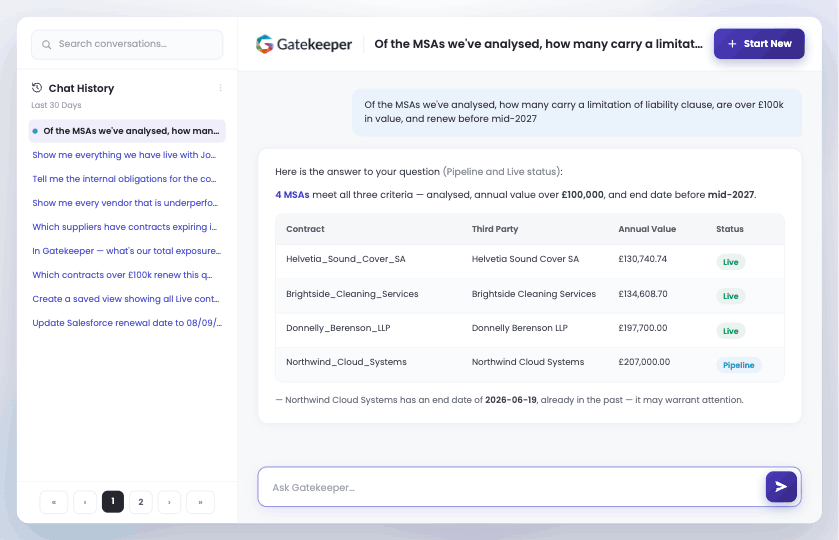
Conversational AI for contract management lets anyone ask a question about their contracts and the third parties behind them, in plain language, and get a structured answer back, with the underlying records linked and existing permissions applied. Gatekeeper Chat is that layer inside Gatekeeper: no new login, no separate data set, and no report to configure first.
Why does answering a simple question about your contracts take so long?
Answering an unplanned question about your contracts is slow because saved views and reports are built for the questions you know in advance. Getting an answer to a new one means choosing a list view, applying filters, adding columns, and exporting, or waiting for the one person who knows how to do it.
That pattern works well for the reporting you run every month. The friction sits in the ad-hoc questions, the ones good contract management still has to answer on demand. The board asks which agreements with a major supplier are still live, and the answer arrives after the meeting has moved on. An auditor asks for a list of contracts by entity and the assembly work lands on whoever knows the system best.
Part of the reason is that the data rarely sits in one place.
Contract-related data is spread across an average of 24 separate systems, which makes tracking commitments and making decisions on time close to impossible.
Where the records already sit together, that particular problem is solved. The data was stored, and it was joined up. What the team lacked was a way to reach the right answer at the moment a decision needed it.
The expectation has moved too. People ask an AI assistant a question on their phone and get an answer back immediately, then open their contract repository and feel the difference. The records are all there. The quick way to ask them was missing.
What is Gatekeeper Chat?
Gatekeeper Chat is the conversational part of Gatekeeper AI, the intelligence layer that turns unified data into answers. It opens the contract and third-party records your team already maintains to plain-language questions, working alongside the list views and saved reports your power users rely on. The data, the permissions, and the governance are unchanged. Only the way in is new.
There is no new login and nothing extra to buy. Gatekeeper Chat sits inside the Gatekeeper unified platform you already use, working against records that are already there, so it extends the value of what you own rather than adding another system to manage.
How is Gatekeeper Chat different from other AI chat features?
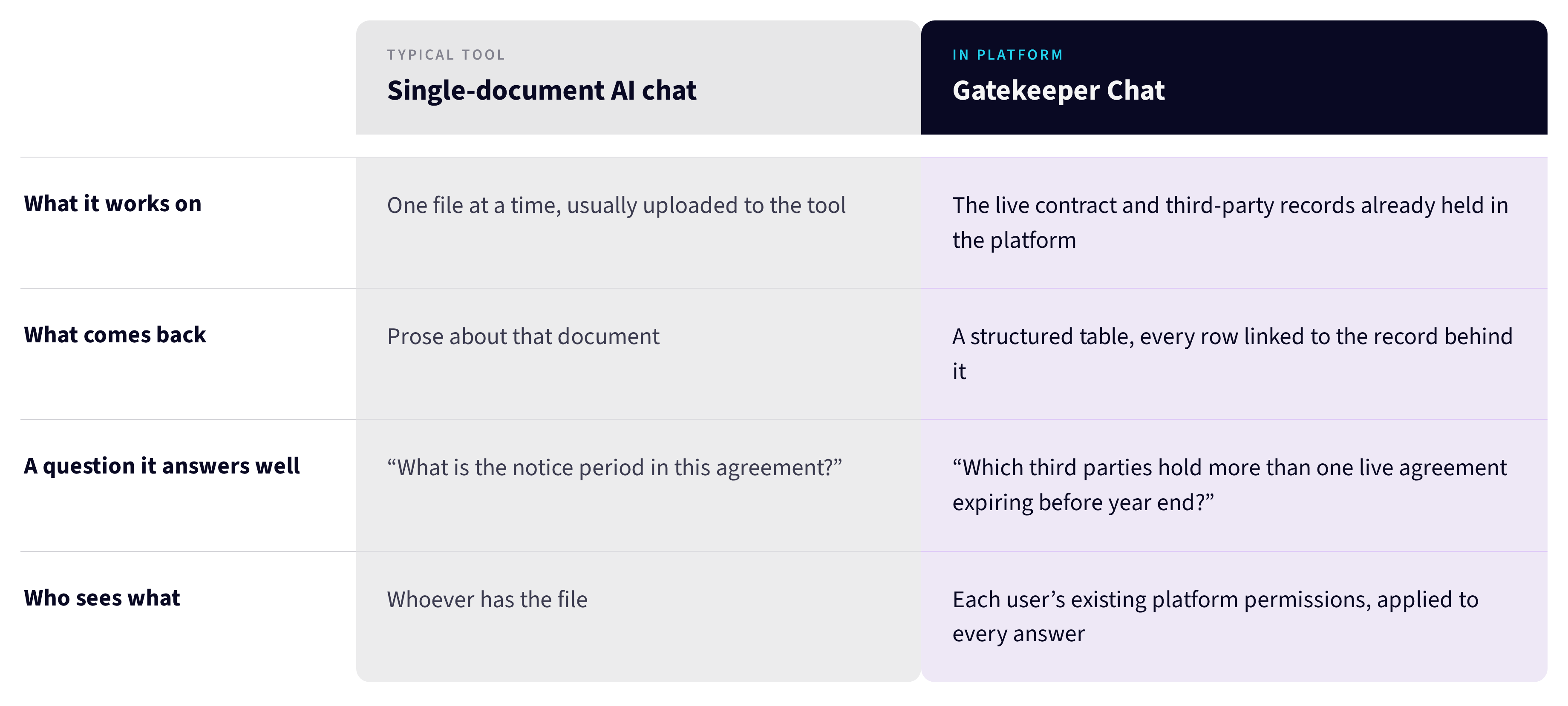
Most AI chat features in point contract lifecycle management tools answer one document at a time: summarise this contract, extract this clause. Gatekeeper Chat asks across the whole set of records instead, joining every contract to the third party behind it, and returns real linked records rather than a pile of PDFs.
Standalone AI tools read the files you upload to them, one at a time. Gatekeeper Chat works against the live structured records already in Gatekeeper, so a question about the whole estate has an answer. Ask which third parties hold more than one live agreement expiring before year end, and a single sentence spans both the contracts and the third-party records they belong to. A question aimed at one document could never have answered it.
The practical difference shows up in what each one can be asked:
For pulling specific terms out of a single agreement, AI contract extraction does that job. Gatekeeper Chat answers the portfolio question.
How does Gatekeeper Chat work?
Using Gatekeeper Chat takes one step: type a question into the chat panel. It interprets the question, fetches the matching records, applies the Gatekeeper permissions the user already holds, and returns a structured table with each record linked. Where the data is incomplete, it names the caveat and offers a follow-up to refine the question.
Three behaviours define how it works:
- Natural language in, structured table out. Ask for your ten highest-value contracts and get the title, third party, annual value, status, type, and expiry back in a table, with every row linked to the record behind it.
- Honest about its data. When something does not aggregate reliably, such as mixed currencies, archived records, or missing fields, Gatekeeper Chat says so. It flags the caveat instead of returning a tidy number it cannot stand behind.
- A conversation that continues. Chat history persists for each user, so a follow-up such as "which of these expire in the next 90 days" carries the context forward.
Every answer respects the access each user already has. A record owner sees the third parties they own, finance sees their entities, legal sees the contracts they own. There is no separate AI view that reaches past the access model you have configured.
How can your team use Gatekeeper Chat?
Teams use Gatekeeper Chat for the questions that used to need a platform expert. Procurement asks which suppliers have more than one agreement up for renewal next quarter. Legal asks which contracts sit with a given counterparty and when each one expires. Finance answers a board question on committed contract value while the meeting is still running.
For procurement, the weekly cross-referencing exercise stops being an exercise. Questions about upcoming contract renewals, duplicate suppliers, and which third party sits behind which agreement get a structured answer without configuring a view first.
For legal, portfolio questions that never matched a saved view come back as records you can open: renewals by jurisdiction, agreements by counterparty, contracts by entity or owner.
An audit or board request becomes an answer for finance with the underlying records attached, ready to stand up to scrutiny. The platform owner gains something different again: the wider business starts helping itself. Every colleague who answers their own question is one fewer ad-hoc request in your queue, which gives back the time the platform was bought to save.
Frequently asked questions
Does Gatekeeper Chat respect our access controls?
Yes. Gatekeeper Chat inherits the Gatekeeper permissions each user already holds. A record owner sees the third parties they own, finance sees their entities, legal sees the contracts they own. There is no separate AI view that bypasses the access model you have configured, so people see only what their role allows.
What data can Gatekeeper Chat answer questions about?
Gatekeeper Chat answers questions about your contract and third-party records: agreements, their key dates and values, the third parties they belong to, and how those records relate to each other. Risk assessment and spend data are outside what it answers today, so questions in those areas still belong in a report or a view.
Can Gatekeeper Chat be wrong?
Like any AI, it can be, but rarely, and only in specific situations, it's upfront about. Gatekeeper Chat is designed to flag those cases: when something doesn't aggregate reliably, like mixed currencies, archived records, or missing fields, it flags the caveats and offers a follow-up. Every answer links back to the records so you can open and check yourself.
How is this different from running a saved report?
A saved view needs you to know the question in advance and to have configured it. Gatekeeper Chat answers the question you have now, including questions that span your contracts and the third parties behind them in one sentence, without configuring anything first. It is most useful for the questions saved views were never built to anticipate.
Do we need to upload or sync anything to use Gatekeeper Chat?
No. Gatekeeper Chat works against the records already in your Gatekeeper account. There is no new login, no new integration, and no separate data set to sync. It queries live data with your existing permissions applied, so the platform you already use starts answering questions.
Ready to ask Gatekeeper a question?
Gatekeeper Chat turns the contract and third-party data you already hold into answers your whole team can reach, in the platform they already use.
Book a demo to see Gatekeeper Chat query your records live, with each row linked and your permissions applied.
Next best read: what is contract management for the wider picture, or AI contract extraction if the immediate need is pulling terms out of individual agreements.
